The short answer
Most Indian clinics still run on a phone line, a register at reception and a crowded waiting room. Patients arrive early because they cannot tell how long the wait will be, and the receptionist spends the morning answering “how many before me?”.
Online booking fixes the waiting, not just the booking. The right system shows patients a live queue, lets reception handle walk-ins and emergencies without breaking the order, and gives doctors a quick prescription desk. This guide covers what to build for a single-doctor practice, a multispeciality OPD and a therapy clinic.
Slots or tokens: pick the model your clinic actually runs
Indian clinics run on two different models, and software built for one feels wrong in the other.
| Model | Typical clinics | What the software must do |
|---|---|---|
| Fixed slots | Physiotherapy, dental, dermatology procedures, therapy, diagnostics | Show free slots, block double bookings, send reminders, handle reschedules |
| Tokens / queue | General physicians, paediatricians, busy OPDs with walk-ins | Issue tokens online and at the desk, show the live token number, estimate waiting time |
| Mixed | Multispeciality clinics | Slots for some doctors, tokens for others, one reception view |
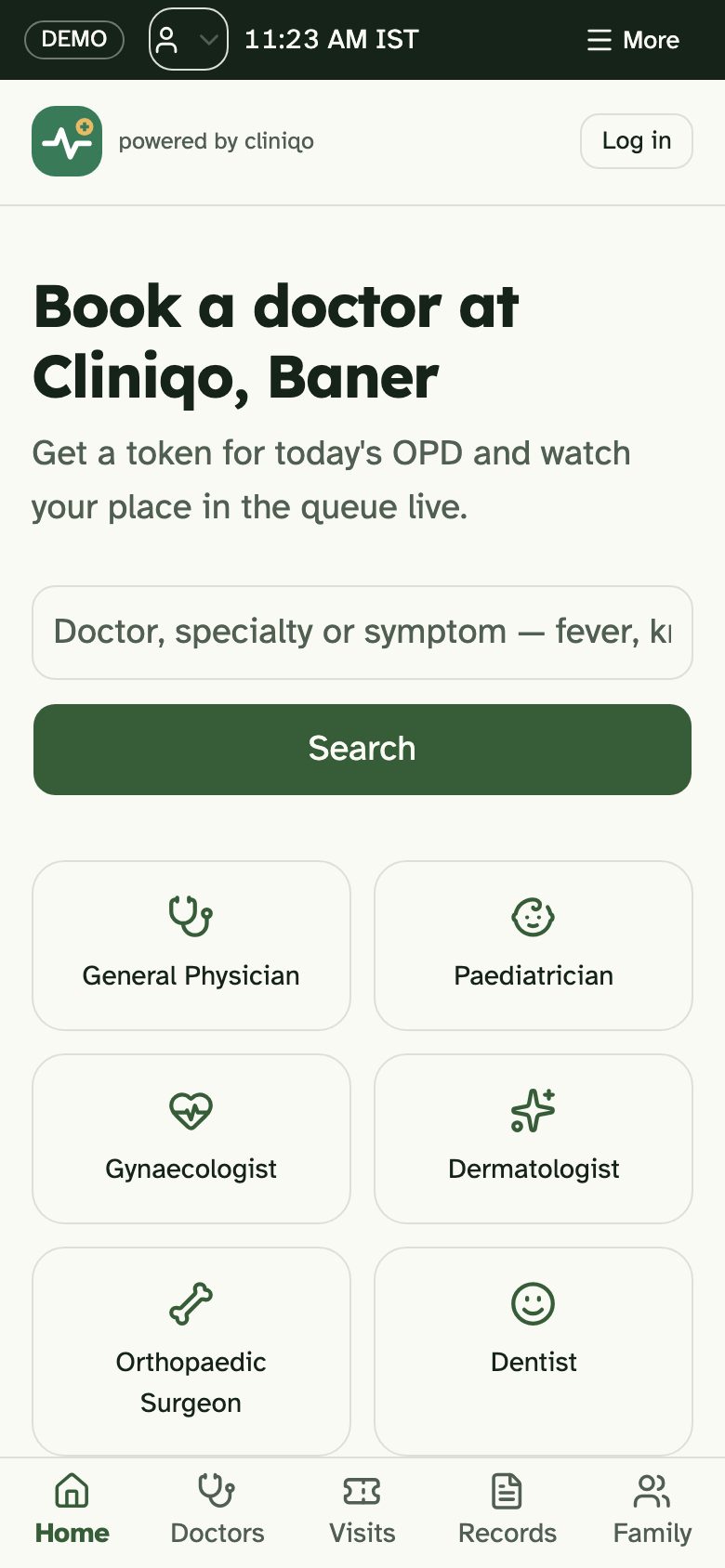
Our builds show both. Cliniqo is a token-based OPD for a multispeciality clinic in Pune with morning and evening sessions. Moviva is a slot-based physiotherapy clinic where the booking system makes double-booking impossible at the database level.
The four screens a clinic needs
- Patient booking — on the website or a web app, no download needed. Choose doctor, see the next slot or the current token, book with a phone number and OTP.
- Reception desk — the real control room. Add walk-ins, mark arrivals, push an emergency to the front, take payments, print receipts.
- Doctor desk — today’s list, patient history, a quick prescription pad with dosage templates, and follow-up booking.
- Waiting-room screen — a TV showing “Now seeing: token 14”. It calms the room more than any other feature.
Many clinics buy only the first screen and wonder why nothing changed. The reception desk is where the day is won or lost, so design it for speed: big buttons, keyboard shortcuts, and no more than two taps to add a walk-in.
Reminders and no-shows
No-shows waste a doctor’s time and someone else’s slot. Reminders cut them sharply when they are timed well:
- Confirmation immediately after booking, with the clinic address and a map link.
- A reminder the evening before, with one-tap reschedule or cancel.
- On the day, for token clinics: “Token 12 is being seen now — you are token 16.”
- After the visit: the prescription or report, and a follow-up reminder if the doctor asked for one.
WhatsApp is usually the channel patients actually read. See WhatsApp for business apps for templates, opt-in and costs.
Prescriptions, records and teleconsults
A digital prescription is legible, searchable and can be sent to the patient instantly. A good prescription desk offers medicine autocomplete, common dosage patterns, saved templates for frequent conditions, and printing on the clinic’s letterhead.
If you add video consultations, the software must support the way telemedicine is allowed to work in India — identifying the doctor and the patient, recording consent, and respecting the limits on what can be prescribed remotely. These are set by national telemedicine practice guidelines, which can be updated.
We are not your legal adviser. Before launching teleconsults or e-prescriptions, have a healthcare lawyer or your medical association confirm the current rules for your speciality.
Clinics that also want medicine delivery or home sample collection can look at Careloop, our concept for pharmacy, lab tests and consults in one loop.
Patient data is the most sensitive data you will hold
Names, phone numbers, symptoms, diagnoses and prescriptions are personal data, and health information deserves extra care. India’s Digital Personal Data Protection Act applies to how you collect, store and share it.
- Collect only what the visit needs. A booking does not need a patient’s full medical history.
- Ask for consent in plain language and record it.
- Restrict access: reception sees appointments, doctors see clinical notes.
- Encrypt data and keep backups; know where your data is hosted.
- Never put diagnoses in a WhatsApp or SMS message. Send a secure link instead.
Our DPDP Act checklist walks through each obligation for app owners.
Single doctor, group practice or hospital OPD
| Clinic size | Start with | Add later |
|---|---|---|
| Single doctor or therapist | Booking page, reminders, simple reception list | Patient portal with exercise plans or reports, online payments |
| Group or multispeciality | Per-doctor schedules, reception desk, waiting-room screen | Prescription desk, analytics on waiting times, teleconsults |
| Hospital OPD | Department queues, registration, billing integration | Lab and pharmacy hand-offs, multiple waiting halls |
Hospitals usually have an existing HIS or billing system; the new booking layer must connect to it rather than replace it on day one.
Payments, fees and the end of the day
Clinics handle many small payments: consultation fees, procedure charges, packages of physiotherapy sessions, report fees. Moving these into the same system as the bookings removes a surprising amount of end-of-day stress.
- Pay at booking or pay at the desk — let the clinic choose per doctor. Prepayment reduces no-shows for procedures and therapy; consultations often stay pay-at-visit.
- UPI QR at reception, linked to the visit, so the payment is matched automatically instead of written in a book. See UPI payments in your app.
- Session packages for therapy and rehab: buy ten sessions, see how many remain, book the next one from the same screen.
- Receipts and invoices generated automatically, with GST where it applies to the service. Ask your accountant which of your services are taxable.
- A daily close report — consultations by doctor, cash versus UPI versus card, refunds — so the owner sees the day in one glance.
For clinics that also sell products — supplements, braces, skincare — the billing side starts to look like a shop. See billing apps for GST billing and stock.
Refund rules for cancelled appointments should be written down and shown at booking. Patients accept a clear policy far more readily than a surprise.
Getting patients to actually book online
- Put the booking link on your Google Business Profile — most patients find clinics through Google Search and Maps. See local SEO for Indian businesses.
- Print a QR code at reception and on prescriptions for the next visit.
- Give online bookers a small advantage, like a reserved token range.
- Keep phone booking open. Older patients will call, and reception should book them into the same system.
- Offer the booking page in the languages your patients speak — see regional language apps.
See doctor appointment apps for what we build, or brief us on your clinic.
Questions people ask
What is the difference between token and slot booking for clinics?
Slot booking gives each patient a fixed time and suits procedures, therapy and diagnostics. Token booking gives patients a place in a queue and shows the live token number, which suits busy OPDs with walk-ins where consultation lengths vary. Multispeciality clinics often need both, configured per doctor.
Do patients need to install an app to book a clinic appointment?
They should not have to. A mobile-friendly booking page that opens from Google, WhatsApp or a QR code is enough for most clinics. A full app makes sense only when patients return often, such as for long rehab plans, chronic care or a large hospital network.
Is it legal to send prescriptions on WhatsApp in India?
Sending a link to a prescription on a secure page is safer than sending the prescription itself in chat. Telemedicine and e-prescriptions follow national guidelines and data protection law, which set rules on identification, consent and what can be prescribed remotely. Check the current rules with a healthcare lawyer before launch.
How do clinics reduce no-shows with online booking?
Timed reminders do most of the work: a confirmation at booking, a reminder the evening before with one-tap reschedule, and live queue updates on the day. Making it easy to cancel frees the slot for someone else, which is better than an empty chair.