The short answer
A logistics app is three products. Customers book a vehicle and watch it move. Drivers accept trips, follow the route and prove the delivery happened. An ops team watches hundreds of trips at once and steps in when one goes wrong. Most failed logistics apps built a lovely booking screen and very little else.
Start with the job your customers pay for — moving a house in a mini-truck, sending a pallet across town, or managing intercity freight for a factory — and design the driver app and ops console around it. The driver app decides whether trips actually happen. The ops console decides whether you can grow past fifty trips a day.
Intracity booking and freight operations are different businesses
Before you scope anything, decide which of these you are. The screens, the data and the people using them are different.
| Intracity booking | Freight and fleet operations | |
|---|---|---|
| Who books | Households, shops and small businesses, often once | Factories, distributors and brands, every day |
| Typical trip | A mini-truck, three-wheeler or bike within the city | Full or part truckloads between cities |
| What they care about | A clear price before booking, a driver who arrives, helpers if needed | Dispatch on time, transit days, exceptions, monthly billing |
| Main screen | A phone app with a map | A dense desktop console with tables and filters |
| Our example | HornOK | Fluxhaul |
If you serve both — say a packers-and-movers brand that also runs contract logistics for retailers — keep one shipment model underneath and build two front ends on top of it.
The customer app: a price people trust
In intracity logistics, the price is the product. People compare it with a phone call to a local transporter, so it has to be clear and final.
- Vehicle picker with real sizes. Show what fits — a single-door fridge, a 2 BHK, forty cartons — not just the vehicle class.
- Upfront fare. Distance-based pricing with loading time, helpers, tolls and waiting charges shown before booking, not added at the end.
- Multi-stop routes. Small businesses often pick up from one place and drop at three. Let them add stops and see the fare change.
- Landmark-friendly addresses. Indian addresses often need a floor, a lift note and a landmark. Let customers add them, and let the driver call through a masked number.
- Live tracking and an ETA. Once the vehicle moves, show it on a map with an arrival estimate the customer can share on WhatsApp.
- UPI, cards and cash. Many intracity customers still pay cash on delivery. Record it properly so the driver's cash is reconciled.
Read adding UPI payments to your app before you decide how cash, UPI and driver payouts fit together.
The driver app decides whether trips happen
Drivers use cheap Android phones, often with patchy data, a mount on the dashboard and one free hand. Design for that, not for a demo on office Wi-Fi.
- Big buttons, few screens, and the language the driver actually reads — Hindi, Kannada, Tamil, Marathi or whatever your fleet uses. See building apps in Indian languages.
- A clear trip offer: pickup, drop, distance, earnings and a timer to accept.
- Loading and unloading checks: photos of the goods, a count, and an OTP or signature from the receiver as proof of delivery.
- Offline tolerance: trips and photos queue up and sync when signal returns, so a dead zone does not lose a delivery record.
- Daily earnings and payouts that drivers can check themselves, without calling the office.
The HornOK driver app is built around exactly these moments: trip offers, route guidance, verified loading and unloading, and a daily payout view.
The ops console: where the business is actually run
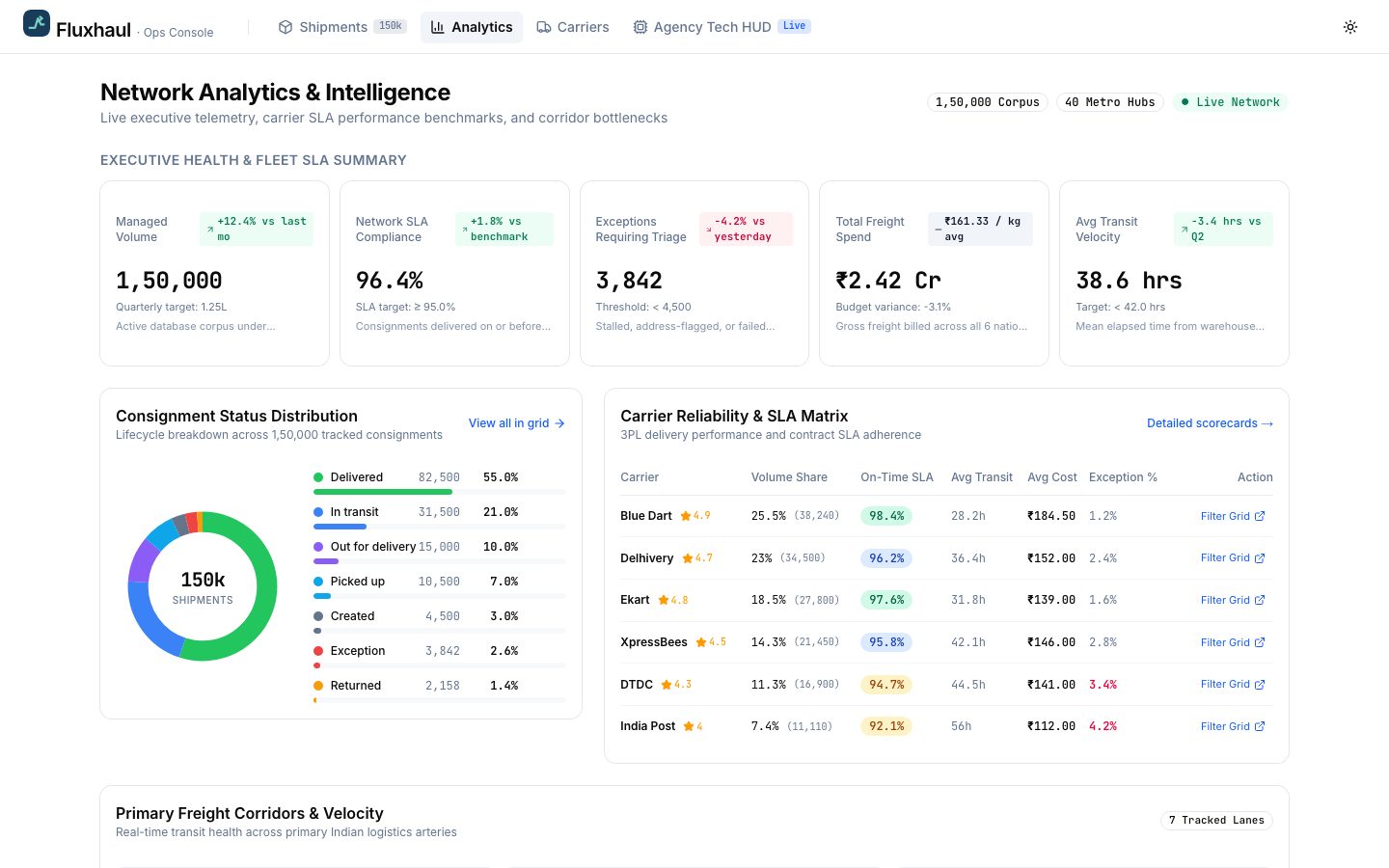
Once you pass a few dozen trips a day, nobody can track them on a phone. The ops team needs a desktop console that stays fast with tens of thousands of rows.
- A shipments table with search, filters, saved views and bulk actions — assign, reschedule, mark delayed.
- An exceptions board that pulls problems forward: a truck stopped too long, a missed pickup window, a delivery past its promised time.
- A live map of vehicles and demand, so you can see where supply is short.
- Driver and vehicle records: documents, permits, insurance and service due dates.
- Reports and exports for billing, transit times and partner performance.
Fluxhaul is our concept for this side: a virtualised freight grid that stays smooth with very large datasets, an exception centre for stranded trucks and late shipments, and corridor-level analytics.
The console is often the biggest single piece of work in a logistics product. If a quote lists only the customer and driver apps, ask where the ops team is meant to work.
Pricing, cash and driver payouts
Money is where logistics apps quietly break. A trip has a quoted fare, extras that appear on the day, cash or UPI collected by the driver, a platform commission, and a payout. Each of those needs a record, or the end of the month becomes an argument.
- Fare rules you can change without a release: base fare per vehicle, per-kilometre rates, minimum fare, loading time, waiting charges, night charges and tolls, all set from the ops console.
- Extras approved in the app. If the customer adds a helper or a stop on the day, the driver requests it and the customer approves the new fare on their phone. No silent changes.
- Cash tracked to the rupee. When a driver collects cash, the app records it against the trip, and the driver's balance shows what they owe the business or the business owes them.
- Business accounts with monthly billing. Regular B2B customers rarely pay per trip. Give them credit limits, a monthly GST invoice and a statement they can download.
- Payouts drivers can predict. Daily or weekly, with every trip, incentive and deduction listed. Drivers who understand their pay stay; drivers who don't, leave.
Build these rules into the data from the first version, even if the screens are simple. Retrofitting cash reconciliation onto a live business is far harder than designing it in.
Mistakes we see in logistics products
- Designing the driver app last. It gets a fraction of the design time and becomes the reason trips fail. Give it as much care as the customer app.
- Automatic dispatch on day one. Matching algorithms need real data to tune. Start with suggestions plus a human in the ops console, and automate once you trust the numbers.
- One huge map as the ops screen. Maps are good for seeing supply, but teams work through lists. Give them a fast table with filters as the main view, and the map beside it.
- No plan for dead zones. Highways, basements and industrial areas lose signal. If proof of delivery needs live data, it will fail exactly when it matters.
- Ignoring the website. Business customers and drivers both judge you on it. A clear pricing page and a driver sign-up form do a lot of selling.
If you are comparing quotes for a logistics build, our guide on choosing an app development company in India lists the questions that expose these gaps early.
Compliance and paperwork to plan for
Goods transport in India comes with paperwork that your app can either ease or ignore.
- E-way bills. Goods moving above a value threshold generally need an e-way bill generated on the government portal. Your app can store the e-way bill number against each shipment, and larger operations integrate with the portal through an authorised provider.
- GST invoices for every trip or a monthly consolidated invoice for business customers. See our GST billing guide.
- Driver and vehicle documents: licence, registration, permits, insurance and fitness, with reminders before they lapse.
- Proof of delivery stored with time, location and photos, for disputes and insurance claims.
Rules on e-way bills, thresholds and document requirements change. Confirm what applies to your goods and routes with your CA before you design the flow.
What to build first
A realistic first version for an intracity logistics business looks like this:
- Customer app with vehicle choice, upfront fare, booking and tracking.
- Driver app with trip offers, navigation hand-off, proof of delivery and earnings.
- A simple ops console: live trips, manual assignment, driver onboarding and refunds.
- A website that explains pricing and signs up drivers and business customers.
Leave automatic dispatch, dynamic pricing and enterprise integrations for version two, once you have real trip data. That keeps a first version in the 8–12 week range we describe in our process. For how scope moves cost, read how much an app costs in India.
Questions people ask
How long does it take to build a truck-booking app?
A first version with a customer app, a driver app and a basic ops console usually takes 8 to 12 weeks. Automatic dispatch, dynamic pricing and enterprise integrations add time, so most businesses launch with manual assignment and add automation once they have real trip data to tune it against.
Do drivers need a separate app?
Yes. Drivers need a simple app built for cheap Android phones, poor signal and one-handed use, in the language they read. Trying to serve drivers through the customer app or WhatsApp messages works for a handful of trips a day, but breaks quickly once you need proof of delivery and payouts.
Can the app handle e-way bills?
It can store e-way bill numbers against each shipment and remind staff when one is needed. Larger operations integrate with the government system through an authorised provider so bills are generated from shipment data. Which goods and values need an e-way bill is a question for your CA.
What does a logistics ops dashboard need?
A fast shipments table with filters and bulk actions, an exceptions board for delays and stuck vehicles, a live map, driver and vehicle records with document expiry, and exports for billing. Speed matters most: the console must stay quick with tens of thousands of shipments, or the team falls back to spreadsheets.